RustDesk Server on Windows without Docker
A no-nonsense guide to running RustDesk OSS Server as persistent Windows services. No Docker. No Pro license. LAN-ready in 15 minutes.

Published April 14, 2026 on matbanik.info

No Docker. No Pro license. Just two binaries and NSSM.
What You're Building
Two binaries — `hbbs` (ID/Rendezvous) and `hbbr` (Relay) — managed by NSSM as auto-start Windows services. Clients on your LAN connect through your server instead of RustDesk's public infrastructure.
Your server generates an Ed25519 keypair on first run. Every client needs the public key to trust your server. Lose the private key, regenerate everything.
---
Prerequisites
Requirement: Windows 10/11 or Server 2019+ · Notes: Tested on Windows 11 24H2
Requirement: Static LAN IP on the server · Notes: DHCP reservation works too
Requirement: Admin access · Notes: Service installation requires elevation
Requirement: RustDesk client installed · Notes: On both server and remote machines
---
Step 1: Download Binaries
Create a dedicated directory. This guide uses `C:\RustDeskServer\` — pick any path, but don't move it after service installation.
RustDesk Server — Latest release
Download `rustdesk-server-windows-x86_64-unsigned.zip`
Extract `hbbs.exe` and `hbbr.exe` into your server directory
NSSM — v2.25 from dkxce fork (recommended by official RustDesk docs)
Extract `win64\nssm.exe` into the same directory
You should have:
C:\RustDeskServer\
├── hbbs.exe
├── hbbr.exe
└── nssm.exe
> Why the dkxce fork? The original NSSM hasn't been updated since 2014. The official RustDesk documentation links to this maintained fork. Version 2.25 fixes critical service management issues on modern Windows.
---
Step 2: Generate Keys
Run `hbbs` once manually to generate the keypair. Open an elevated PowerShell:
cd C:\RustDeskServer

# Start hbbr first (hbbs expects it)
Start-Process .\hbbr.exe -WindowStyle Hidden
Start-Sleep -Seconds 3

# Start hbbs — replace YOUR_SERVER_IP with your static LAN IP
Start-Process .\hbbs.exe -ArgumentList "-r YOUR_SERVER_IP" -WindowStyle Hidden
Start-Sleep -Seconds 5

# Kill both
Get-Process hbbs, hbbr -ErrorAction SilentlyContinue | Stop-Process -Force
Your directory now contains:
C:\RustDeskServer\
├── ...
├── id_ed25519           ← Private key (NEVER share this)
├── id_ed25519.pub       ← Public key (clients need this)
└── db_v2.sqlite3        ← Created later, on first client connection
Read your public key — you'll need it for every client:
Get-Content .\id_ed25519.pub
# Output: something like "OeVXq8zY1r3kP7mN=..." — save this.
---
Step 3: Install NSSM Services
This is where most guides fail. Three settings are non-negotiable on Windows 10/11:
1. `AppNoConsole 1` — Without this, NSSM silently fails to start the service. This is a documented NSSM bug on modern Windows.
2. `AppDirectory` — Without this, key files and the database land in `C:\Windows\System32`. Your server won't find its own keys.
3. `DependOnService NlaSvc` — Without this, the service starts before the network adapter is ready and fails to bind ports.
$DIR = "C:\RustDeskServer"
$IP  = "YOUR_SERVER_IP"   # ← Replace with your static LAN IP

# --- Install hbbr (Relay) ---
& $DIR\nssm.exe install hbbr "$DIR\hbbr.exe"
& $DIR\nssm.exe set hbbr AppDirectory $DIR
& $DIR\nssm.exe set hbbr AppNoConsole 1
& $DIR\nssm.exe set hbbr Start SERVICE_DELAYED_AUTO_START
& $DIR\nssm.exe set hbbr DependOnService NlaSvc
& $DIR\nssm.exe set hbbr AppStdout "$DIR\hbbr_stdout.log"
& $DIR\nssm.exe set hbbr AppStderr "$DIR\hbbr_stderr.log"
& $DIR\nssm.exe set hbbr AppRotateFiles 1
& $DIR\nssm.exe set hbbr AppRotateOnline 1
& $DIR\nssm.exe set hbbr AppRotateBytes 1048576

# --- Install hbbs (ID/Rendezvous) ---
& $DIR\nssm.exe install hbbs "$DIR\hbbs.exe" "-r $IP"
& $DIR\nssm.exe set hbbs AppDirectory $DIR
& $DIR\nssm.exe set hbbs AppNoConsole 1
& $DIR\nssm.exe set hbbs Start SERVICE_DELAYED_AUTO_START
& $DIR\nssm.exe set hbbs DependOnService "NlaSvc" "hbbr"
& $DIR\nssm.exe set hbbs AppStdout "$DIR\hbbs_stdout.log"
& $DIR\nssm.exe set hbbs AppStderr "$DIR\hbbs_stderr.log"
& $DIR\nssm.exe set hbbs AppRotateFiles 1
& $DIR\nssm.exe set hbbs AppRotateOnline 1
& $DIR\nssm.exe set hbbs AppRotateBytes 1048576

# --- Start both ---
& $DIR\nssm.exe start hbbr
Start-Sleep -Seconds 3
& $DIR\nssm.exe start hbbs
Verify:
Get-Service hbbs, hbbr | Format-Table Name, Status, StartTypeBoth should show `Running` / `Automatic`.
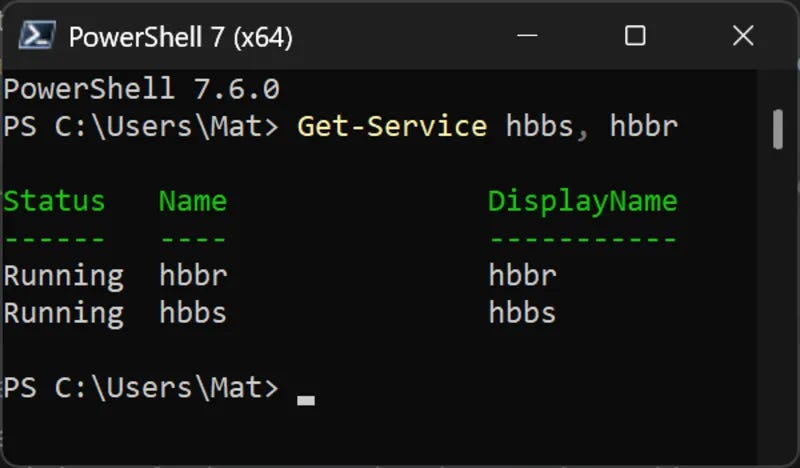
Both services running with delayed auto-start
---
Step 4: Verify Ports
RustDesk uses five ports. Only three are required for basic LAN operation:
Port: 21115 · Protocol: TCP · Service: hbbs · Purpose: NAT type test · Required: ✅
Port: 21116 · Protocol: TCP+UDP · Service: hbbs · Purpose: ID registration + heartbeat · Required: ✅
Port: 21117 · Protocol: TCP · Service: hbbr · Purpose: Relay (actual remote sessions) · Required: ✅
Port: 21118 · Protocol: TCP · Service: hbbs · Purpose: Web client (websocket) · Required: ❌
Port: 21119 · Protocol: TCP · Service: hbbr · Purpose: Web relay (websocket) · Required: ❌
Quick check:
netstat -an | findstr /R "2111[5-7].*LISTENING"You should see six lines (three ports × IPv4 + IPv6). If any are missing, check the stderr logs.
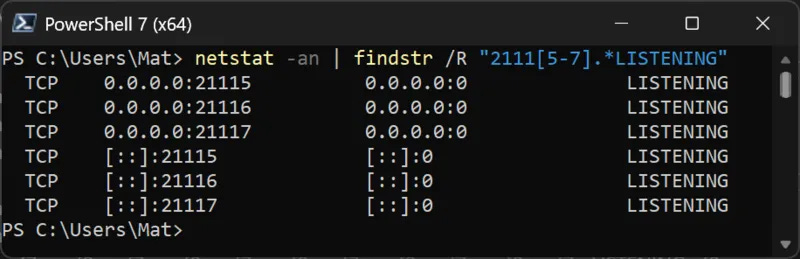
All six listeners confirmed — three ports on IPv4 and IPv6
Firewall: If your Windows Firewall is enabled, create inbound rules:
New-NetFirewallRule -DisplayName "RustDesk hbbs TCP" -Direction Inbound -Protocol TCP -LocalPort 21115-21116 -Action Allow -RemoteAddress YOUR_SUBNET/24
New-NetFirewallRule -DisplayName "RustDesk hbbs UDP" -Direction Inbound -Protocol UDP -LocalPort 21116 -Action Allow -RemoteAddress YOUR_SUBNET/24
New-NetFirewallRule -DisplayName "RustDesk hbbr TCP" -Direction Inbound -Protocol TCP -LocalPort 21117 -Action Allow -RemoteAddress YOUR_SUBNET/24
Replace `YOUR_SUBNET/24` with your LAN range (e.g., `192.168.1.0/24`) to restrict access to local machines only.
---
Step 5: Configure Clients
Every client — including the one on the server machine — must point at your server.
Option A: Command Line (Recommended)
Windows:
& "$env:ProgramFiles\RustDesk\rustdesk.exe" --config "host=YOUR_SERVER_IP,key=YOUR_PUBLIC_KEY"macOS:
sudo /Applications/RustDesk.app/Contents/MacOS/RustDesk --config "host=YOUR_SERVER_IP,key=YOUR_PUBLIC_KEY"Option B: GUI
In RustDesk → Settings (⚙) → Network → ID/Relay Server:
ID Server: `YOUR_SERVER_IP`
Key: contents of `id_ed25519.pub`
Relay Server: leave blank (auto-detected from ID Server)
API Server: leave blank (Pro feature only)
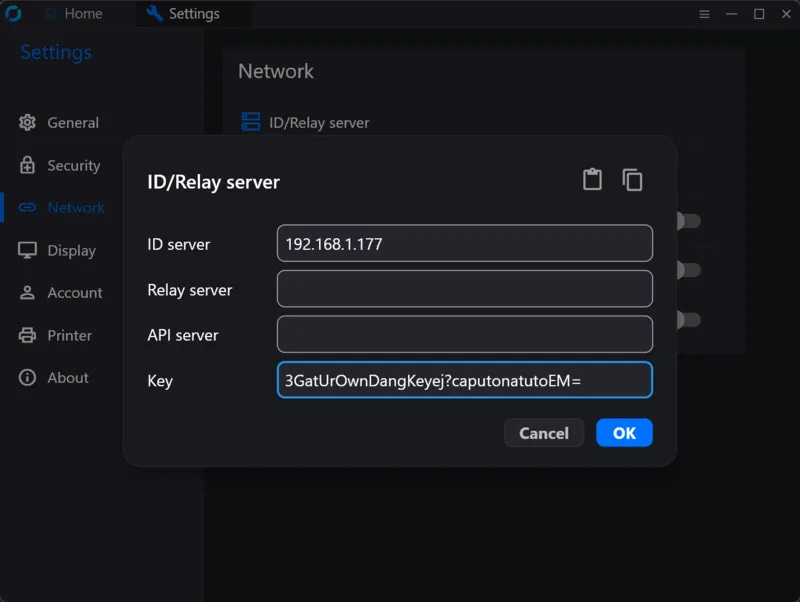
ID Server and Key are the only fields you need — leave the rest blank
Verify Client Registration
After configuring, check the server log:
Get-Content C:\RustDeskServer\hbbs_stdout.log -Tail 5You should see `update_pk <CLIENT_ID>` entries for each client that connects. If a client's ID shows as "does not exist" when you try to connect, that client hasn't registered with your server yet.
Both sides of every connection must use the same server. This is the #1 support issue.
---
Maintenance
Task: Service status · Command: `Get-Service hbbs, hbbr`
Task: Server logs · Command: `Get-Content C:\RustDeskServer\hbbs_stdout.log -Tail 20`
Task: Restart services · Command: `Restart-Service hbbs; Restart-Service hbbr`
Task: Stop services · Command: `Stop-Service hbbs; Stop-Service hbbr`
Task: Remove services · Command: `nssm remove hbbs confirm; nssm remove hbbr confirm`
Task: Regenerate keys · Command: Delete `id_ed25519*`, restart hbbs
---
Pitfalls That Will Waste Your Time
NSSM service silently fails to start.
Set `AppNoConsole 1`. This is a known NSSM issue on Windows 10/11 where console allocation fails in the service context. Without this flag, the service enters a start/stop loop with no useful error.
Keys/database appear in System32.
Set `AppDirectory` to your server folder. NSSM defaults to the system directory as the working directory for services. hbbs writes its files relative to the working directory.
Service fails on boot, works fine when manually started.
Add `SERVICE_DELAYED_AUTO_START` and `DependOnService NlaSvc`. The network adapter isn't ready when early-start services begin. Delayed start with a network dependency solves this.
"ID does not exist" when connecting.
Both the source and target machines must be configured to use your server. A client pointing at the public RustDesk servers has an ID that only exists there — your server has no record of it.
Don't run the RustDesk Server GUI wrapper alongside NSSM.
The `RustDeskServer.Setup.exe` GUI installer and NSSM both try to manage the same binaries. Pick one. This guide uses NSSM because it survives reboots without requiring a user login.
The `-k _` flag is not needed. Key-based authentication has been the default since server v1.1.11. Including it is harmless but unnecessary.
Relay server in client config is optional. When the relay server runs on the same machine as hbbs (the common case), clients auto-detect it. Only set this if your relay is on a different host.
---
Sources
RustDesk Windows & NSSM — Official Docs
RustDesk Client Deployment Scripts
Originally published on matbanik.info